
Class Scheduling Software for RTOs: The Complete Guide
Every multi-site RTO knows the moment the week starts to wobble. A White Card class in Penrith shifts because a trainer calls in sick, a traffic control combo at Auburn fills faster than expected, and the spreadsheet on someone's laptop becomes the only thing standing between order and chaos. That's where class scheduling software stops being a nice admin tool and starts acting like operational control.
For vocational training, the job isn't just putting names into time slots. It's keeping classes, trainers, rooms, enrolments, attendance, and compliance records tied to the same live record so the business can move without breaking its own rules. At a higher-education level, that central control is already treated as institutional infrastructure, not an informal booking habit. The University of Queensland requires all classes related to delivery of a course to be timetabled through a central system, not scheduled ad hoc, and it also requires enrolment estimates to be based on realistic projections supported by relevant data (UQ policy).
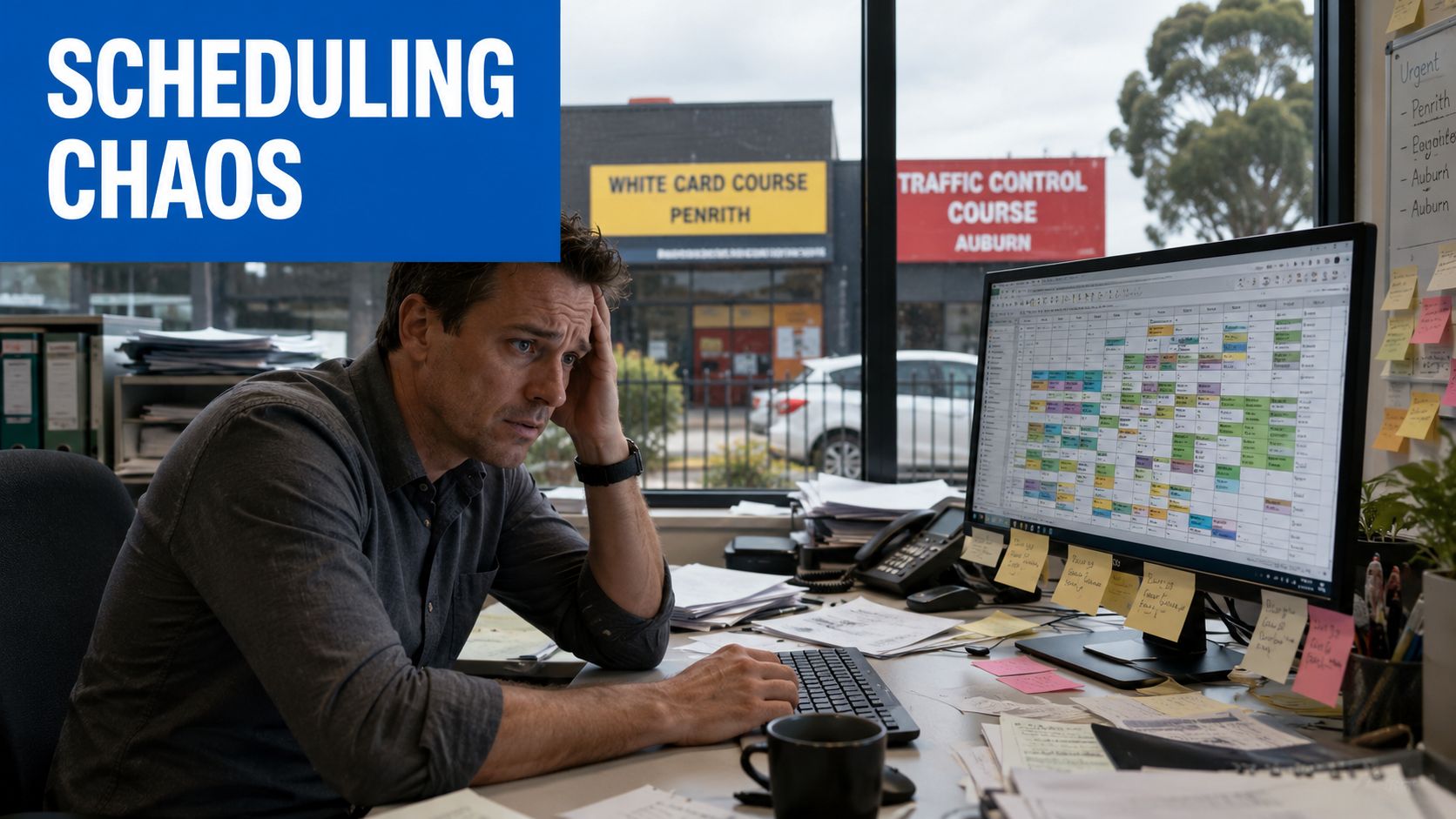
For an RTO, that's the dividing line. A calendar shows availability. A scheduling system has to decide whether a class can exist at all, whether it has the right trainer and room, whether attendance is captured correctly, and whether the resulting record can support downstream reporting and audit work. When those pieces live in different places, the admin team spends its time reconciling errors instead of running courses. TP Training's own vocational training overview shows how broad that operational load can get across construction, traffic control, first aid, hospitality, and short courses in NSW (vocational training in Australia).
Why Class Scheduling Software Decides Your Training Operation's Success
A multi-site RTO doesn't fail because nobody can make a timetable. It fails when the timetable can't absorb reality. One room is booked twice, a trainer gets moved, a class is rescheduled for a public holiday, and the people answering phones are left stitching together a day that was supposed to be simple.
The difference between a calendar and an operational system
A calendar answers one question, “what's on next?” A proper class scheduling software platform has to answer several more at once. Who is teaching, which room is available, which learners are assigned, what happens if the class changes, and how attendance flows back into the learner record all matter just as much as the time slot itself.
That's why simple booking tools break down in short-course environments. A forklift class or traffic control intake can change quickly, and those changes don't live in isolation. If the schedule isn't linked to enrolment and attendance, someone ends up rekeying the same information three times.
Practical rule: if a change in one class forces manual updates in two other systems, the software is too thin for vocational training.
Australian higher-education timetable policy shows the same principle from another angle. The University of Canberra requires classes to start on the half-hour, use 30-minute blocks, and finish at least 10 minutes before the end of the booked period, while also giving teaching and exam bookings priority in the right windows (University of Canberra timetable policy). Those are system rules, not cosmetic preferences. A real scheduling tool has to enforce them consistently.
Why throughput and compliance belong in the same workflow
The strongest scheduling platforms don't treat attendance as an afterthought. They bind the class record to the enrolment record, then keep the attendance record in the same workflow so follow-up actions stay synchronised. In RTO operations, that's the difference between a tidy roster and a usable compliance trail.
That workflow matters even more for short, high-turnover courses across multiple sites. The schedule changes often, trainers get reallocated, and room conflicts don't wait for end-of-day administration. A system that can't keep up forces staff to make judgment calls in the moment, then clean up the record later. That's usually where mistakes creep in.
The Australian market has already moved in this direction. Allocate Plus, a major class allocation and timetable solution created in Melbourne more than 20 years ago, is now used in more than half of Australian universities, including the majority of Group of Eight and Sandstone universities, with the vendor saying more than 50% of university students in Australia register for classes through it (Allocate Plus). That's a strong sign that scheduling software in Australia has shifted from simple timetable creation into large-scale allocation and resource control.
Core Features and Must-Have Integrations to Evaluate First
A tidy interface can hide weak controls. In class scheduling software, the test is whether the system can stop bad bookings, keep the class record tied to the enrolment record, and move attendance into the same workflow without extra admin. For short-course, multi-site RTOs, that matters more than how polished the screen looks.
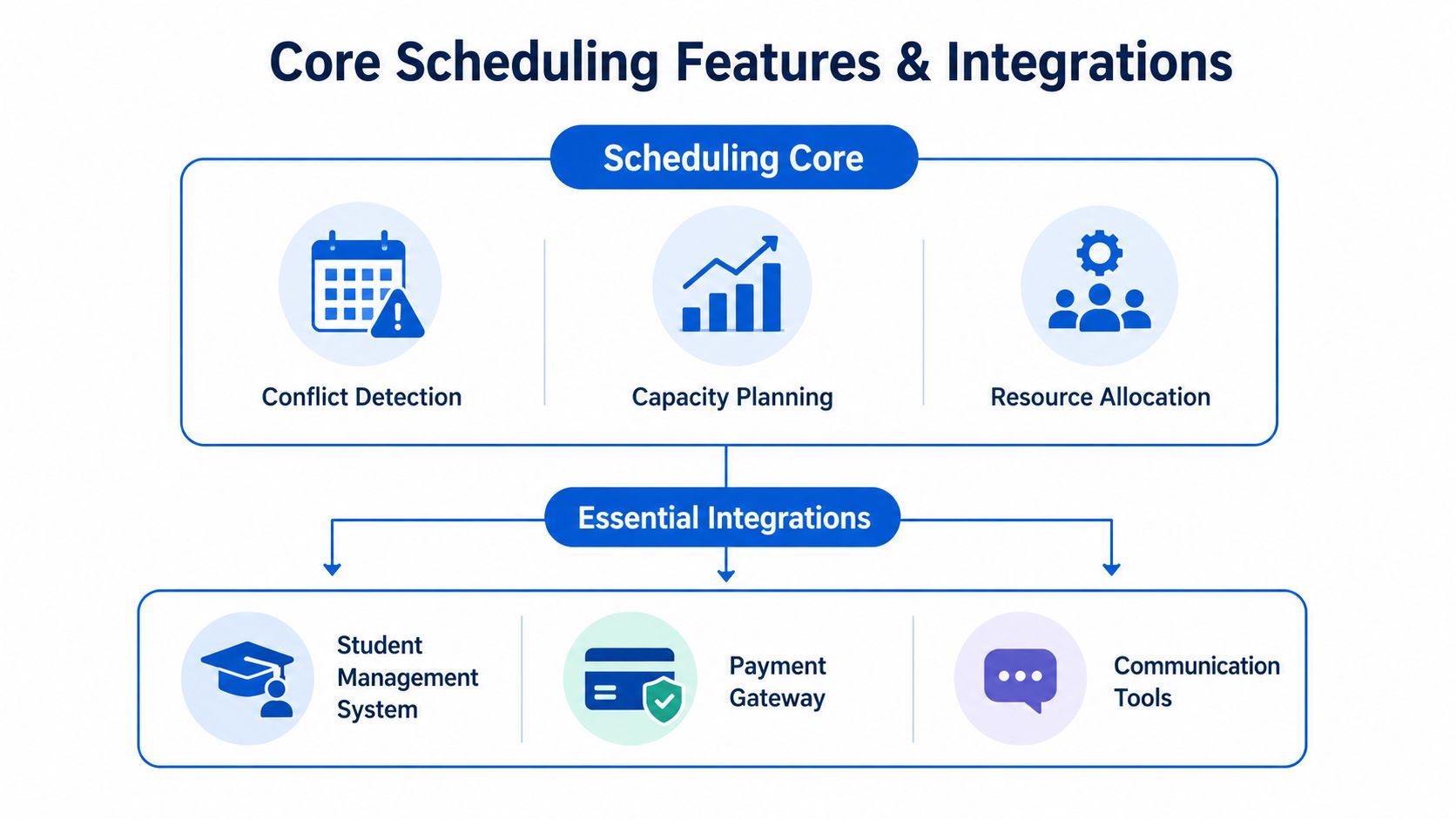
The scheduling core that has to work first
The first check is whether the platform handles conflict detection, capacity planning, and resource allocation without staff having to police it in the background. If a trainer, room, or equipment overlap only shows up after save, the system is pushing the cleanup back onto operations. Calendar sync with Outlook or Google Calendar still matters, but it is a visibility layer, not the control layer.
The better test is whether the software turns timetable data into useful operational information. SchoolData's catalogue describes timetable generation and related lists alongside instant statistics such as face-to-face teaching load, staff allowances, underloaded teachers, part-time staff, and average metrics from imported timetable data (SchoolData catalogue). That kind of output is more useful than a pretty grid, because it shows whether the scheduler can support day-to-day decisions, not just display them.
Integrations that close the booking gap
Payments are the first integration I look at. If enquiry, booking, and enrolment sit in separate tools, the admin team ends up chasing deposits and reconciling records by hand. A good setup ties the booking step to the payment step so staff can see what is confirmed without digging through inboxes and spreadsheets.
Notifications matter for short courses because the booking window is tight. SMS and email reminders reduce no-shows, and they also cut the number of calls and follow-ups the front desk has to handle. Payroll and rostering connections matter for the same reason. When trainer delivery data flows into pay workflows, staff do not have to rebuild the week from attendance sheets.
For RTOs, I also check whether the platform links timetables to enrolment, attendance, and compliance records in a way that supports AVETMISS-linked reporting. That is where student identifiers matter as well. A scheduling system that can reference the USI process alongside enrolment data is easier to trust when records need to match across systems. Region-specific training platforms also emphasise conflict detection, capacity planning, automatic calendar sync, QR-based check-in, and timestamped attendance, which reduces manual roll-marking and improves auditability (Selma SIS timetable and attendance).
A practical evaluation checklist keeps the comparison honest:
- Conflict rules: Does the system stop trainer, room, or cohort clashes before save?
- Attendance capture: Can attendance be recorded against the class record, not in a separate sheet?
- Notification flow: Are reminders automatic and configurable?
- Calendar sync: Do changes push to staff calendars without re-entry?
- Audit trail: Can it show who booked, who changed, and who attended?
- Reporting linkage: Does the class record feed the compliance record cleanly?
TP Training provides factual context here through its Cpccldg3001 Perform Dogging Licence Course And Training In Sydney course. For delivery like that, the scheduling system has to manage trainer availability, learner attendance, and site changes without creating another layer of admin.
The same expectation appears in the University of Canberra timetable policy. A scheduler that cannot respect booking priority, class timing rules, and exam-period conflicts will not hold up under operations pressure. That is the standard to apply when evaluating software for training delivery.
When a Simple Calendar Stops Being Enough
A simple calendar works until the business starts behaving like one. The moment you have short courses, multiple sites, changing trainers, and learners booking on different timelines, the calendar becomes a record of hope rather than a control system. At that point, the question isn't whether scheduling exists. It's whether scheduling can keep up with delivery.
Compare the two models against real work
| Capability | Simple Calendar | Training-Management Platform |
|---|---|---|
| Booking setup | Manual entry, usually one event at a time | Class templates, linked enrolments, reusable sessions |
| Conflict handling | Staff spot clashes after they appear | Conflicts flagged before confirmation |
| Attendance | Separate sheet or manual tally | Attendance tied to the class record |
| Compliance workflow | Extra admin outside the calendar | Enrolment, attendance, reporting in one flow |
| Multi-site delivery | Hard to see cross-site constraints | Central view across centres and trainers |
| Change management | Reschedule by hand, then update everyone | Cascade updates to calendars, notifications, and records |
| Reporting | Basic schedule view only | Operational reporting and audit-friendly history |
That difference matters when the day changes under you. A public holiday can force a forklift course to move. A basic calendar can shift the time, but it won't automatically handle room reallocation, trainer reassignment, and updated notifications across all affected records. A training-management platform is built for that sort of knock-on effect.
Where the simple option breaks first
The first failure is usually not the class itself. It's the admin around the class. Someone updates the timetable, someone else updates the learner list, and a third person still has the old version in their inbox. Once that happens, the business starts relying on memory instead of system truth.
The second failure is enrolment pressure. An employer group booking can fill a class overnight, which sounds like a win until the schedule, capacity, confirmation emails, and attendance records don't all update together. That's where a simple tool becomes a liability. It was built to display dates, not manage throughput.
A useful way to judge the break point is this:
- Stay with a simple calendar if classes are few, sites are fixed, and booking changes are rare.
- Move to a training-management platform when cancellations, room swaps, trainer changes, and enrolment surges are part of normal operations.
- Treat compliance as the deciding factor if attendance, learner records, and reporting need to stay aligned without duplicate handling.
TP Training's own operations span Penrith, Burwood, Auburn, Parramatta, and Sydney CBD, which is exactly the kind of spread that turns scheduling into a control issue, not a convenience issue. For a practical note on how course support and content planning can sit alongside scheduling decisions, the company's piece on online animated video maker shows how delivery materials can become part of the broader operational stack.
How Tutorbase Can Help
Some providers outgrow spreadsheets and general calendars because the pain isn't just scheduling. It's the knot between booking, billing, payroll, and room management. Tutorbase is built for tutoring centres and language schools that need one platform for those moving parts, with scheduling features that fit operations where lessons, teachers, rooms, and payments all interact.
Its scheduling tools are practical rather than decorative. Find Slot generates teacher, room, and time combinations for new bookings based on availability, subject, and capacity, while Find Spot filters existing classes with open seats by subject, level, teacher, time, and location. That's useful when the problem isn't creating a class, but placing a student into the right one without breaking the week's plan. Tutorbase also includes conflict detection, recurring lesson setup, multi-branch dashboards, and room tracking, which makes it a fit when admin teams are spending too much time hunting through calendars. One useful reference point is Tutorbase's own class scheduling software page, which lays out the scheduling workflow in more detail.
The platform also goes beyond scheduling in the ways that matter operationally. Attendance feeds billing automatically, teacher payroll can account for different pay models, and lead management pulls enquiries into a structured pipeline. That combination is what makes it relevant for businesses where admin time is the bottleneck, not just the booking screen. For tutoring centres, language schools, test prep operations, music schools, and after-school programs, that broader workflow can be the difference between a tidy schedule and a usable operating system.

That said, Tutorbase is built for tutoring and lesson-based businesses, not vocational RTO compliance. If your main pain is multi-site class allocation, trainer movement, and attendance tied to compliance records, it's worth treating Tutorbase as a comparison point rather than a direct fit. The lesson is simple, pick software that matches the workflow you run, not the one the demo makes look clean.
Managing Scheduling Across Multiple Training Centres
Multi-site scheduling works only when the rules are centralised. If each centre improvises its own booking habits, Penrith, Auburn, Parramatta, Burwood, and Sydney CBD all start behaving like separate businesses. That's the fastest route to duplicated rooms, mismatched trainer coverage, and learners turning up at the wrong site.
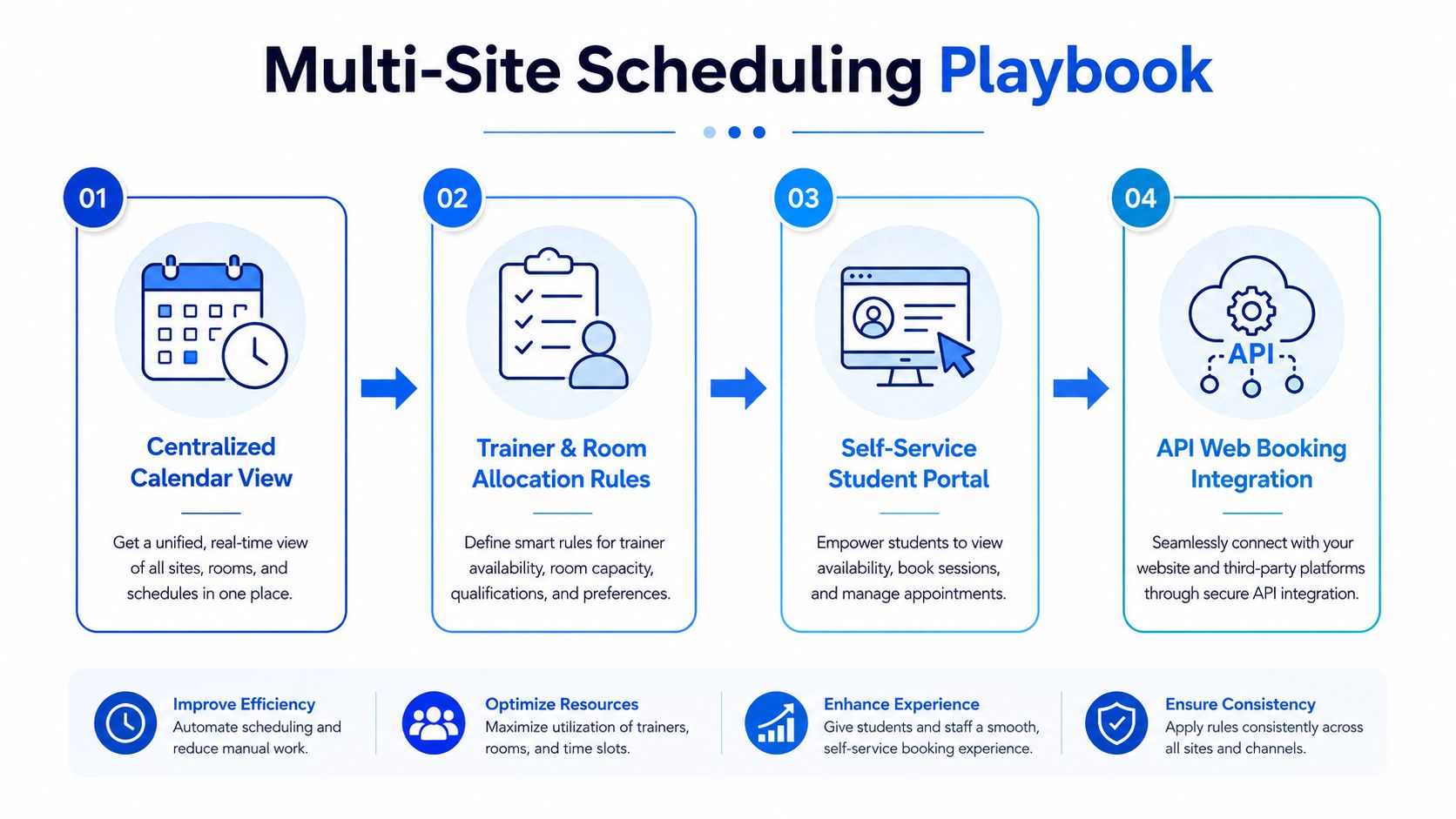
Set one live view, then enforce local rules
A centralised calendar view is the starting point, but it's not enough on its own. The system also needs trainer and room allocation rules that reflect site constraints. If a room is set aside for high-risk work, or a trainer only works certain campuses, that logic has to live in the system before anyone opens a class.
The Australian training market already points in this direction. Regional systems now market advanced scheduling, multi-site calendars, self-service enrolment, and API-based web booking because providers need to coordinate dispersed locations and short-course intakes efficiently (Vasto Software). The point isn't just avoiding double bookings. It's keeping seats filled and trainers used well while courses are published quickly across centres.
Operational rule: one source of availability, one source of truth, and one set of reallocation rules across all sites.
Manage change before it hits the front desk
Last-minute change management needs a pre-set response. If a trainer is sick, the system should show backup coverage, not force a manual scramble. If enrolments are low, the cancellation rule should trigger the same way every time. If two sites want the same room type, one booking needs priority logic, not a conversation that drifts across emails.
Self-service enrolment helps because job seekers, workers, and employers expect fast booking access and low-friction rescheduling. That expectation matters on busy training days, especially when short courses move quickly and people book around work shifts. A live booking link or API-based booking flow makes the schedule responsive to demand instead of frozen in a static PDF timetable.
TP Training's multilingual support announcement is a good reminder that scheduling and access often sit together in practice, especially when learners need frictionless communication around bookings and changes (TP Training multilingual support). Scheduling software should make that kind of support easier to deliver, not harder.
Use a simple site-by-site playbook
For multi-location delivery, keep the workflow consistent:
- Open availability centrally: no centre should publish its own shadow timetable.
- Reserve trainers by role: don't book a person before checking their site, qualification, and load.
- Treat rooms as finite assets: if a room is needed for one class, it can't be assumed free for another.
- Push changes instantly: any update should flow to bookings, calendars, and notifications at the same time.
- Watch live demand: if a class is trending full, publish the next intake before the current one closes.
A basic calendar usually fails here. It can show what happened. It can't reliably manage what should happen next. A multi-site RTO needs the latter.
Vendor Evaluation, Security and Your Migration Checklist
The right platform still fails if the migration is sloppy. Most software projects don't break on launch because the features were wrong. They break because the data was dirty, the permissions were vague, or the team assumed the old spreadsheet could be imported without cleanup. That's the mistake to avoid first.
Judge the vendor against vocational training needs
Start with compliance capability. If the platform can't handle AVETMISS-linked workflows, learner identity controls, and the record structure your team needs, it doesn't belong in the shortlist. Then look at local support hours, because scheduling failures don't wait for a help desk in the wrong time zone.
Data residency and access control deserve equal attention. Ask where data is stored, who can access it, how permissions are separated between admins and trainers, and whether backups are routine rather than optional. A system that looks polished but has weak role controls will create problems the first time a site coordinator sees the wrong class data.
Total cost matters too, but not just licence fees. Include setup, training, migration labour, integrations, and the cost of cleaning up bad historical data. The software that looks cheap at purchase can become expensive once your admin team spends weeks reconciling broken fields.
Ask the security questions before the demo ends
A good demo should answer practical questions, not just show polished screens. Ask how the vendor handles backups, role-based permissions, password policies, audit logs, and recovery if something goes wrong during the cutover. If the answer stays vague, assume the operational risk stays with you.
One thing many teams underestimate is the quality of the existing data. Old class codes, duplicate learner names, inconsistent site labels, and mixed attendance formats create more migration pain than any feature gap. That cleanup work is boring, but it's also where most migration failures start.
A straight migration checklist helps keep the project grounded:
- Audit current data: list every class, learner, trainer, room, and historical attendance field in use.
- Map the fields: decide where each old field lands in the new system, and which ones should be retired.
- Run parallel scheduling: keep the old method alive for one term while the new system proves itself.
- Train admins and trainers: don't assume people will infer new workflows from the interface.
- Cut over with a rollback plan: if something critical fails, know how to revert fast without losing the week.
TP Training's own website redesign announcement is a useful reminder that operational systems and customer-facing systems move together more often than teams expect (TP Training website redesign). If booking, enquiry, and course display live in different places, the migration should account for that before go-live.
Choose the go-live path that reduces risk
The safest rollout is the one that gives staff time to spot weak points before they reach learners. Parallel scheduling for one term, followed by a controlled cutover, usually exposes the core issues early. Those issues are almost always human, not technical, and they're easier to fix before the old system is switched off.
If the vendor can't support a staged migration, keep looking.
Optimising Your Scheduling After Go-Live
Once the system is live, the work changes from setup to refinement. The biggest gains usually come from tightening the loop between demand, published classes, trainer load, and attendance follow-up. That's where the software starts paying back the team that had to survive the migration.
Seat fill is the first metric worth watching closely. If classes are publishing too late, or if the next intake isn't visible soon enough, the schedule will keep reflecting yesterday's demand rather than today's bookings. Trainer utilisation matters just as much, because an RTO can be busy and still waste capacity if sessions are unevenly distributed across centres.
Use the data to fix the publishing rhythm
Scheduling data should change how courses are released. If one course type fills fast while another lingers, publish the next intake earlier for the fast mover and stop overproducing the slow one. That sounds obvious, but many teams keep publishing on habit because nobody has a clean view of which sessions are pulling demand.
SMS and email follow-up help with no-shows, but they also reveal patterns. If missed classes cluster around a certain day, time, or location, the problem may be the schedule, not the students. A better system lets that feedback shape the next timetable instead of hiding it in reports no one reads.
A simple optimisation habit looks like this:
- Review seat fill regularly: identify classes that consistently close late.
- Check trainer balance: avoid overloading one site while another sits underused.
- Track attendance follow-up: use reminders and rescheduling prompts where no-shows recur.
- Shorten publishing cycles where demand is predictable: publish faster when bookings cluster around clear patterns.
- Keep compliance joined to the workflow: if attendance or learner status drifts out of sync, fix the process, not just the record.
Australian scheduling software has already evolved from simple timetable creation into resource utilisation and attendance-support workflows, and that direction matters for RTOs. The software now has to help teams decide what to open, what to close, and where to place the next class, not just display the current one. That's the value after go-live.
If the system is doing its job, the admin team should spend less time on roll-marking and reporting, trainers should see fewer last-minute surprises, and learners should find it easier to book into the right class without phone calls or back-and-forth emails. That's the point of the switch. Not prettier timetables, stronger control over how the training operation runs.
If your RTO is still stitching scheduling together with spreadsheets, shared calendars, and inboxes, it's time to map the actual workflow and compare it against a system that can hold classes, attendance, and compliance in one record. Start with your next intake, audit the conflicts that keep repeating, and trial a platform that can handle multi-site changes without turning your admin team into a repair crew.

You may also like

CPR Training Face Shields: A Practical Australian Guide

Civil Construction Plant Operations Courses Explained