
Online Animated Video Maker: Create Training Videos Fast
If you've ever stared at a stack of outdated PDFs, slide decks, and sign-off notes and thought, “We need this turned into something people will watch,” you're not alone. That's the point where an online animated video maker starts to earn its keep, especially for Australian training teams juggling induction updates, safety refreshers, and course promotion across multiple sites.
The strongest case for animation in training isn't novelty. It's speed, consistency, and the ability to turn a process that's usually trapped in text into something people can follow quickly on a phone, in a classroom, or before a shift starts. For younger audiences in particular, YouTube's independent animation research shows recurring viewing habits around creator-led animated content, including 63% of animation fans aged 14 to 24 who watch animated series created for YouTube weekly or more, and 61% who say they like independent animators on YouTube as much as or more than major-studio animation. That's a useful benchmark for anyone building short, digital-first training assets, even if the survey itself is U.S.-based, because the viewing pattern explains why template-based tools have become practical for workplace learning YouTube independent animation trends report.
Why Australian Training Teams Are Switching to Animated Video
A training coordinator in a civil or construction business usually doesn't get a clean run at production time. One site wants a traffic control refresher this week, another supervisor needs a White Card update next week, and the compliance team wants the message kept identical across every location. That's where an online animated video maker beats the old model of waiting on a full studio edit.
The practical reason teams move now
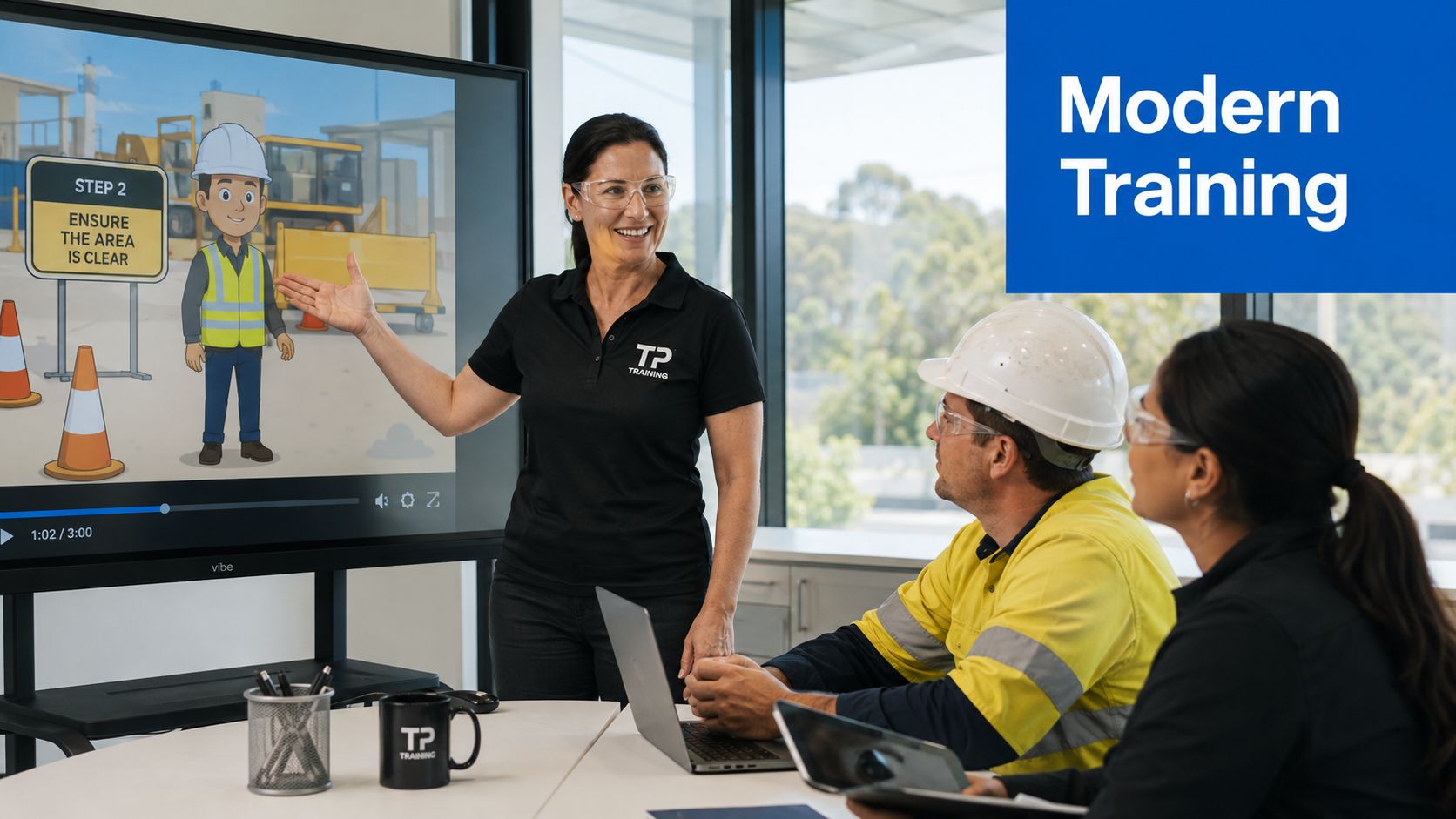
Animated training content fits the way work happens. Short videos are easier to distribute than thick documents, easier to revisit than live briefings, and easier to update when a procedure changes. In practice, that makes them useful for construction inductions, traffic control briefings, first aid refreshers, toolbox talks, and compliance updates.
The market context matters too. Independent industry reporting puts the global animation market at about US$462 billion in 2025, with projections to US$492 billion in 2026. It also puts 3D animation at US$25.26 billion in 2024, projected to reach US$51.03 billion by 2030, which tells you animation is now a mainstream production category, not a niche design toy animation industry statistics.
Why templates replaced studio bottlenecks
Most workplace videos don't need cinematic complexity. They need clarity, clean pacing, and a repeatable structure that a coordinator can refresh without starting from zero. That's why template-based tools work so well for routine learning assets, especially when the message is the same across multiple cohorts but the examples need to stay local and job-specific.
For TP Training's audience, that might mean a quick safety reminder for a classroom in Burwood one week and a site-ready induction for a civil crew in Penrith the next. If a team is already producing practical course content like the Food Safety Supervisor certificate pathway, animation can slot into the same workflow without turning every update into a production project.
Practical rule: if the message needs to be repeated, revised, or delivered across multiple sites, animation usually saves more time than a polished live-recorded video.
Choosing the Right Online Animated Video Maker for Training Content
Selecting a platform for training content is different from choosing one for social promotion. A marketing team might care most about motion style. A training team has to care about captions, revision control, brand consistency, and whether the export will still behave properly inside an LMS six months later.
Compare tools against training-specific needs
The most useful filter is simple, can the platform support the way people learn at work? For a White Card induction, you need readable on-screen text and a voiceover that doesn't sound like it was written by a brochure. For traffic control microlearning, you need subtitles and mobile-friendly layout. For first aid or machinery safety, you need enough control to keep visual steps accurate and not overly decorative.
| Selection Criteria | Why It Matters for Training | What to Look For |
|---|---|---|
| Caption and subtitle support | Helps mobile viewers, hearing-impaired learners, and staff watching with sound off | Easy subtitle editing, readable placement, exportable caption files |
| Plain-English voiceover options | Reduces confusion in compliance and induction content | Natural narration, easy script editing, controlled pacing |
| Brand asset control | Keeps every module consistent across sites and teams | Brand kit, reusable templates, logo and colour locking |
| Template relevance | Safety topics need layouts that suit procedures, not sales pitches | Induction, checklist, or step-by-step templates |
| Export flexibility | Training videos often need different versions for LMS, portals, and public pages | MP4 output, chapter support, caption files, size control |
| Revision workflow | Safety content changes, and old versions can't linger | Versioning, scene-level edits, quick re-export |
This is also where cost-effectiveness has to be judged carefully. A fast tool only helps if it cuts the time spent briefing, reviewing, and re-editing. For many small providers and employers, the key gain is not a flashy animation library, it's the ability to produce dependable content without dragging a designer into every update.
If you're comparing tools for a civil construction audience, the Riimpo320F Excavator Operations Course Conduct Civil Construction course is a good example of the kind of hands-on content that benefits from a clean animated explanation of process before practical assessment.
For providers building compliance modules in NSW, TP Training's own course mix shows why platform choice matters across categories like CPR, First Aid, White Card, and Workplace Safety Certifications, because the same tool has to serve different content types without losing control.
Scripting and Storyboarding Your First Training Animation
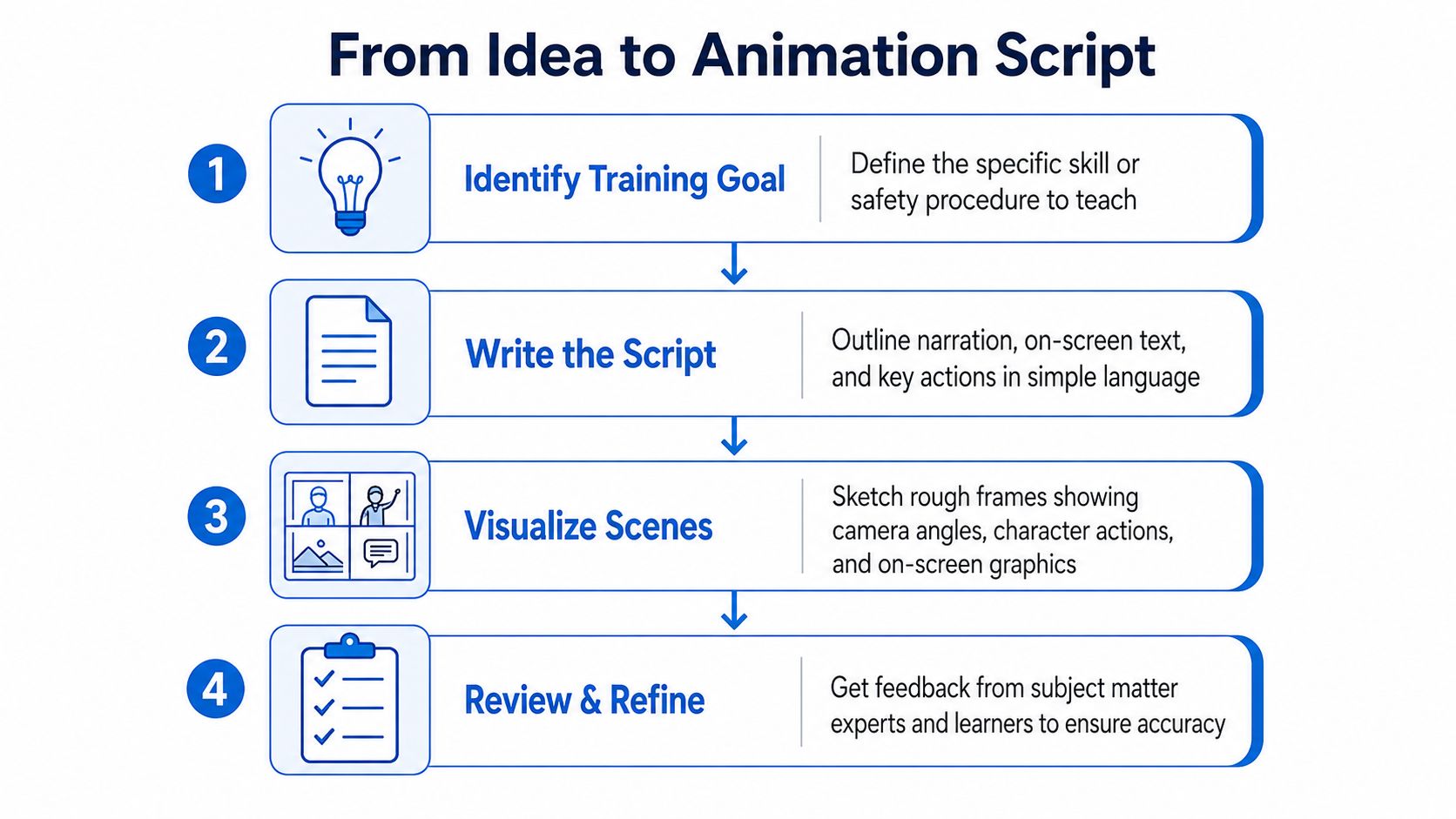
A strong training animation doesn't start in the editor. It starts with one objective, one audience, and one action you want the learner to remember. If the script tries to cover three procedures at once, the final video becomes a blur of captions and icons.
Start with the task, not the visuals
Write the training goal first in plain English. For example, if the topic is a White Card refresher, the objective might be simple, explain the steps workers follow before entering a site and the behaviours that keep them compliant. That keeps the script focused on safe actions instead of drifting into generic commentary.
The quickest way to plan a useful scene is to break the message into tiny units. Each unit should answer one question, what does the learner need to see, hear, and do next? When that's clear, animation becomes a support layer rather than a distraction.
A workable storyboard pattern
For a traffic control briefing, I'd map the video like this.
- Open with context, show the work zone and the role of the controller.
- Show the key hazard, use simple visuals so the risk is obvious.
- Demonstrate the correct action, keep the motion slow enough to follow.
- End with the check, repeat the action the learner needs to remember.
That structure works because it mirrors how people remember procedures, not how software menus are organised. It also makes review easier for supervisors, because they can spot missing steps before anything goes live.
Keep the delivery spec fixed from day one
Adobe's animation guidance is straightforward, keep shoot, edit, and export settings aligned, and use H.264 MP4 for broad playback compatibility across phones and widescreen TVs Adobe animation guidance. In practice, that means deciding early on the frame rate, resolution, and delivery format so you aren't rebuilding scenes later because one cut was made for a phone and another for a laptop.
A useful habit is to write the narration beside the storyboard frame. If the voiceover says “check the exclusion zone,” the visual should show that zone, not a random stock icon. That tight pairing is what makes the video feel like training, not decoration.
A similar discipline helps with more technical vocational material, such as Cpccldg3001 Perform Dogging Licence Course And Training In Sydney, where every visual cue has to support safe understanding before a learner ever gets near equipment.
Keep the script short enough that each scene can be reviewed by a subject matter expert without side conversations about style.
How Knowlify Can Help
If the main problem is turning documents, URLs, or rough ideas into narrated training videos quickly, Knowlify sits squarely in that gap. It combines a self-serve platform with a full-service studio, so a team can either build content directly or hand over scripting, storyboards, and animation end to end.
Its feature set is broad. The platform supports AI script generation, document, URL, and video-to-video conversion, 140+ voices and accents, voice cloning, brand kits, reference images, custom characters, avatars, 30+ languages, captions, quizzes, clickable calls to action, SCORM packaging, LMS integrations, shared workspaces, and API access. The studio option is useful when the team needs a finished video without absorbing the production load internally, with turnaround in as little as 72 hours.
For people comparing vendors, the most useful external overview is Knowlify's own guide to an online animated video maker, because it puts the platform in the context of practical video creation rather than empty feature lists. I'd see Knowlify as a fit when the team needs both speed and control, especially if the output has to move between induction content, compliance modules, and multilingual delivery without rebuilding the workflow each time.
Building Scenes, Timing Animations, and Adding Voiceover
Once the script is approved, the work is making the scenes feel clear at mobile size. That means choosing visuals that match Australian workplaces, not generic office cartoons, and pacing the animation so the narration has room to breathe. For learners in construction, civil works, warehousing, and logistics, the best videos are usually the ones that don't try to impress them.
Build for the smallest screen first
A surprising amount of training video content falls apart on phones. Text becomes cramped, motion feels rushed, and a helpful label ends up sitting under a character's elbow. If your audience might watch during a break, in a ute, or on a site laptop, design with that reality in mind.
Good scene building starts with a simple hierarchy. Put the main action in the centre, keep secondary objects minimal, and make the text large enough to read without zooming. If the learner has to squint, the scene is already doing too much.
Layer audio without overwhelming the message
Voiceover should lead. Music should support. Sound effects should be used sparingly, only when they reinforce a step or help the learner notice a change in scene. Heavy background music can make a compliance video feel polished, but it also competes with the words people need to hear.
For multilingual or mixed-language audiences, which is a real consideration in Australia given the country's diverse language backgrounds, the narration needs to be slower and clearer than a marketing video. TP Training's multilingual support page is a useful reminder that training audiences are rarely uniform, and that video clarity matters when learners speak English, Mandarin, Korean, or Vietnamese at different levels of fluency TP Training multilingual support.
Practical rule: if a scene needs more than one spoken sentence to make sense, the visual probably needs simplifying.
Keep captions and typography readable
Captions are not an optional extra for workplace learning. They matter for accessibility, for noisy environments, and for anyone watching with the sound down. Use high-contrast text, avoid decorative fonts, and keep caption placement away from busy lower-screen elements.
A calm pacing strategy helps too. Short scenes, fewer words, and consistent movement make the video easier to follow on a phone. That's especially important in training content that may be watched by non-native English speakers or by staff who need to review a step twice before they can apply it safely.
Export Settings and Platform Optimisation for Real Workflows
Export is part of the learning design, not a final technical checkbox. A file that plays well in an LMS but drops captions, or looks fine on YouTube but stutters in a portal, adds avoidable friction for learners and administrators.
Match the file to the use case
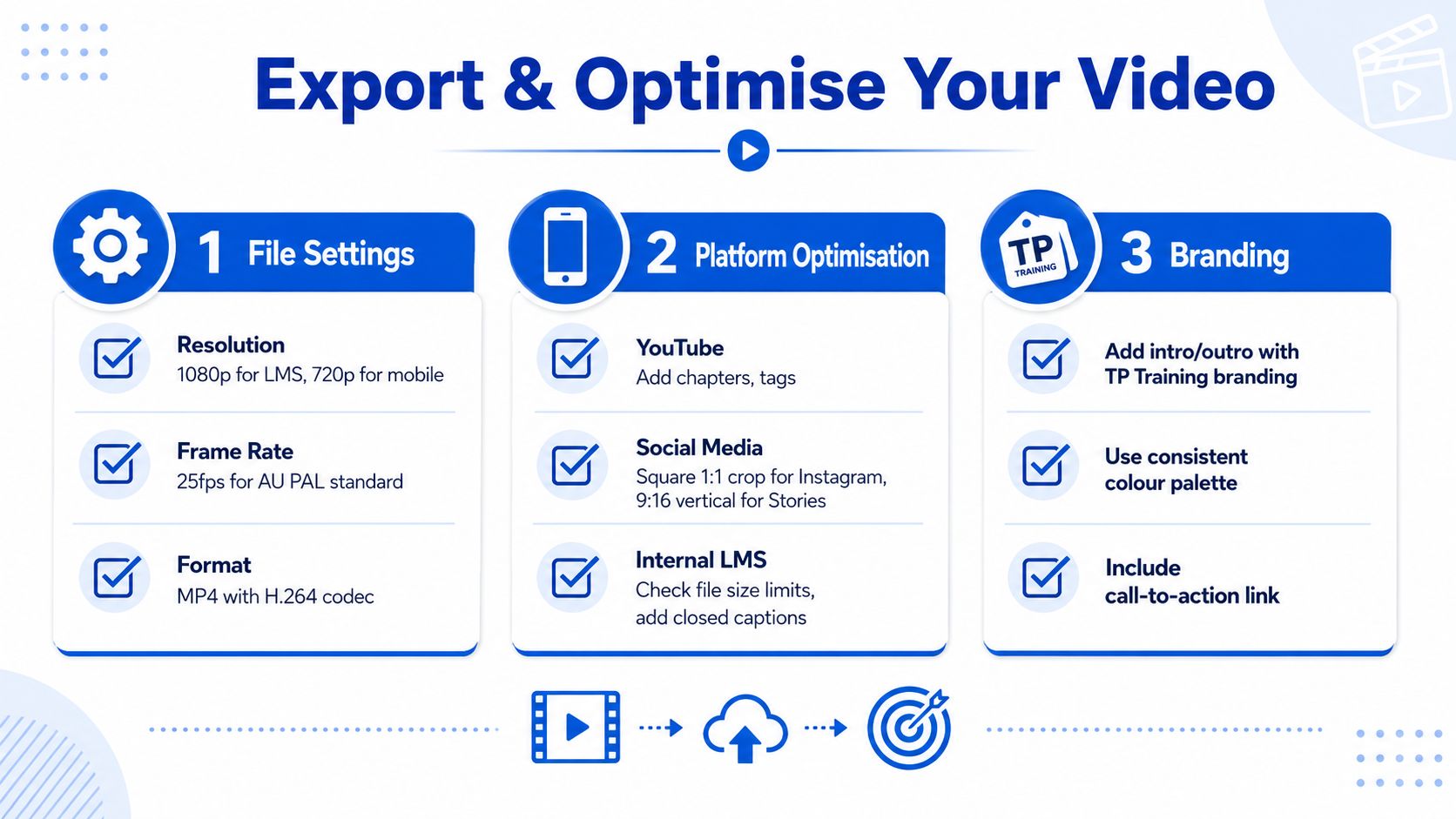
Use MP4 with H.264 when broad compatibility matters, because that format usually behaves well across phones, browsers, and most learning systems. For most Australian workplace workflows, the decision is usually about balancing quality against file size, not chasing the highest possible spec. If a module will be used for inductions or refresher training, I also check whether the player preserves captions and whether the file still performs well after the LMS compresses it.
A common assumption is that faster production automatically means better training. It doesn't. If the video is oversimplified, learners may remember the animation style and miss the actual safety step. That is a real risk in topics where the difference between a helpful visual shortcut and a misleading one is thin, especially for compliance and site induction content.
Think in versions, not one master file
One export rarely suits every channel. A learning management system version may need tight file control and captions. A YouTube version may benefit from chapters and stronger metadata. A promotional course page might need a shorter cut that is more visually energetic and less procedural.
Use the same core assets, then adapt the output. That is how teams build a reusable library without rebuilding every module from scratch. It also makes revision control cleaner when a procedure changes, because the same scene sequence can be updated rather than recreated. TP Training's website redesign update shows why this matters in practice, because distribution and presentation need to work together when content sits beside course pages and service pages TP Training website redesign update.
Protect the brand and the learner
Branding in training videos should stay subtle. Use the same colours, consistent intro and outro treatment, and predictable text placement so learners know they are in the same learning environment each time. That consistency builds trust, especially when the topic is technical or safety related.
For mobile viewing, keep the thumbnail clear and the on-screen titles short. If a learner cannot understand the subject at a glance, the video will be skipped, no matter how good the animation looks. Good optimisation is less about polish and more about making sure the right person can find, open, and use the file.
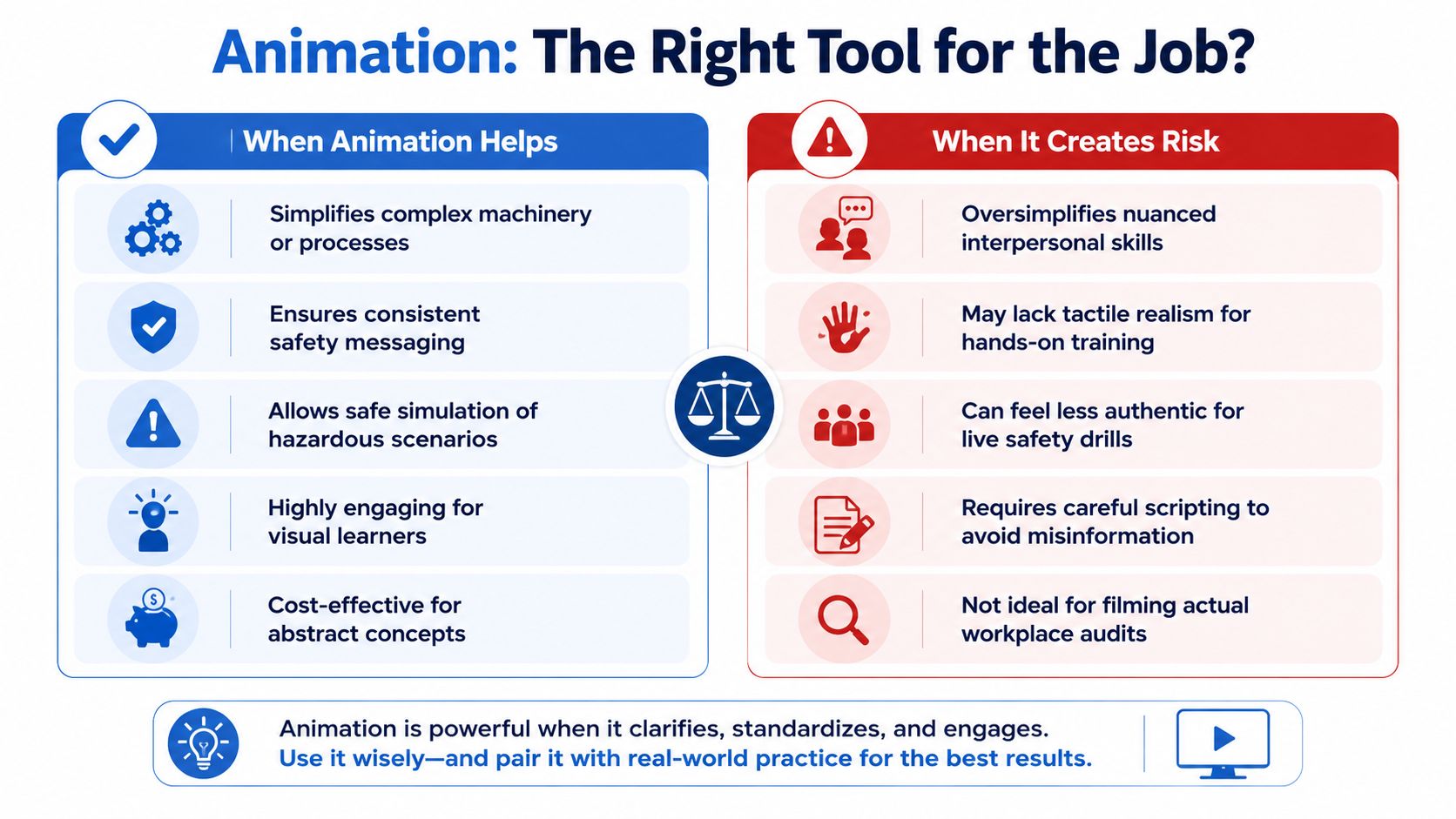
When Animation Helps Training and When It Creates Risk
Animation is strongest when it turns invisible structure into visible steps. It works well for process explanations, sequence learning, and messages that need to stay consistent across different trainers. It is weaker when the job depends on touch, timing, judgement, or real-world exposure.
Where animation earns its place
It's a strong fit for topics where learners need to understand a sequence before they do the practical version. That includes many induction topics, safety refreshers, and site rules. It also helps when the situation is hazardous, because animation can safely simulate a problem without putting anyone near the risk.
Where it can create trouble
Animation can fail when it flattens a skill that needs physical judgement. A learner may understand the sequence of a task but still need hands-on demonstration to build confidence. That's why animation shouldn't replace practical assessment in areas like traffic control, high-risk work licences, or civil construction machinery operations.
The same caution applies to topics with compliance weight, including asbestos awareness, where the message has to stay precise and the learner has to understand the practical limits of the advice TP Training asbestos awareness. If the visuals oversimplify the hazard, the video can create a false sense of security.
A simple decision check
Before you make the video, ask three questions.
- Does this topic rely on sequence or explanation? If yes, animation can help the learner follow it.
- Does the task require physical practice or site judgement? If yes, pair animation with live demonstration.
- Could a simplified visual cause misunderstanding? If yes, keep the animation tightly reviewed by a subject matter expert.
That's the right way to use an online animated video maker in workplace training, as a communication tool that supports learning, not a shortcut that removes professional judgement. For compliance content, the best result is usually a hybrid one, animated explanation first, then practical verification in the actual environment.
A Repeatable Workflow for Your Next Animated Training Video
The easiest way to keep animated training useful is to treat it as a repeatable system. Pick the platform based on training needs, script the single outcome, storyboard the scenes, review for accessibility, and export in the right format for the channel. After that, keep the file versions tidy so revisions don't become a mess.
A small library of reusable assets pays off quickly. Induction openings, warning icons, safety transitions, and branded outro screens can all be reused across modules, which makes future updates faster without compromising consistency. The last step is to review learner feedback and update the video whenever procedures, branding, or compliance language changes.
If you're ready to build training content that people will finish, start with one short module, not a full library. Pick one safety topic, one audience, and one export destination, then test the workflow from script to playback before scaling it across your induction or course catalogue.

You may also like

High Risk Work Solutions in Australia: A Practical Guide

Basic Fatigue Management Course Guide for NSW Workers